One Email, Three Issues — How Smart Splitting Actually Works
Customers report multiple problems in one message. Smart issue splitting detects them automatically, so nothing gets lost. See how it works.

Triagly Team
Most feedback doesn't come neatly labeled. A customer sends one email mentioning a bug, a missing feature, and a strategic question—all tangled together. In a spreadsheet, that's one row. One label. One chance for important things to get buried.
Triagly reads these messy messages and splits them automatically into separate, classified feedback items. Each one gets tracked on its own terms. Bugs don't disappear into the noise. Questions don't get missed.
The problem: one email, one ticket
When a customer sends something like this:
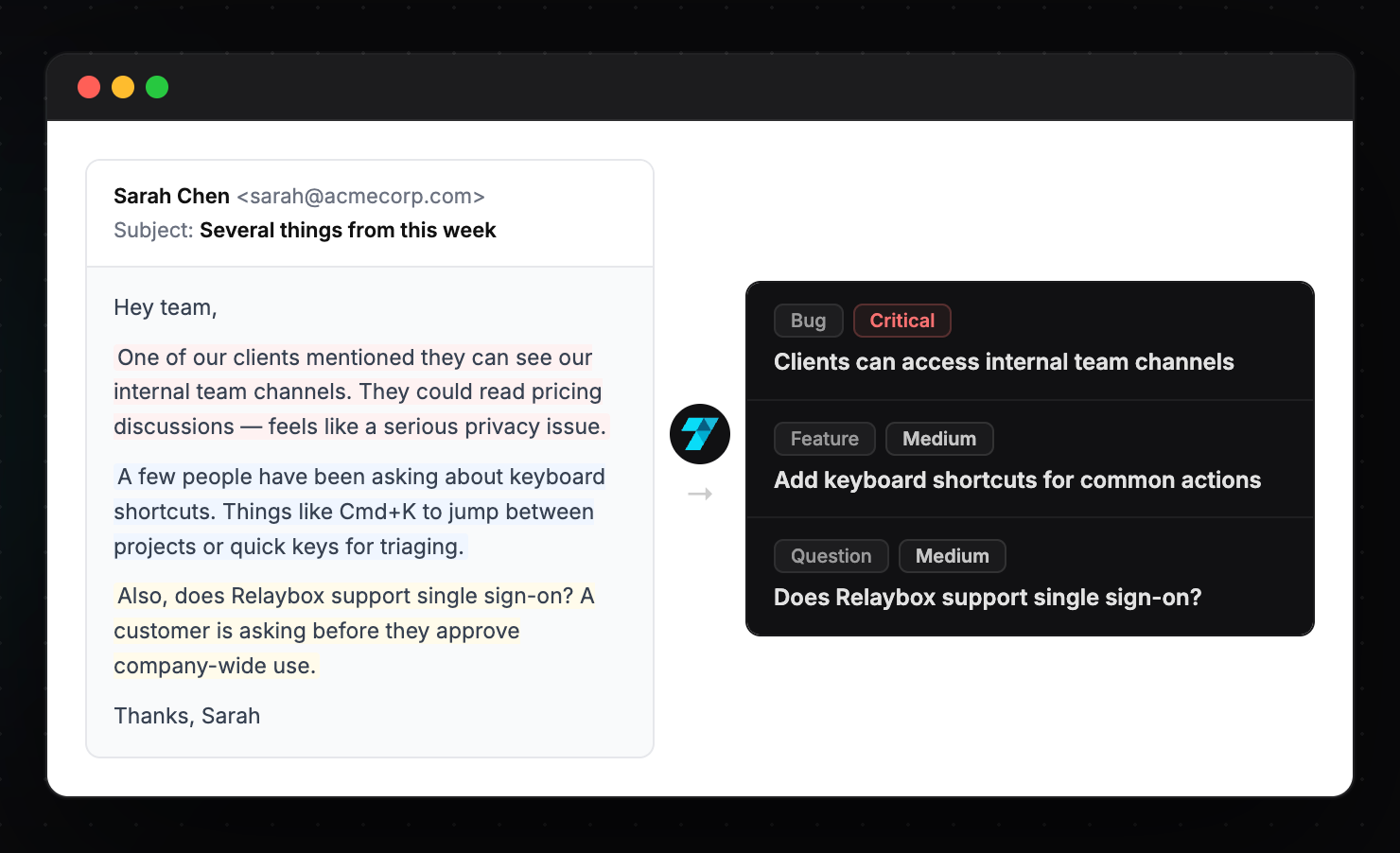
"One of our clients mentioned they can see our internal team channels. They could read pricing discussions — feels like a serious privacy issue. A few people have also been asking about keyboard shortcuts, things like Cmd+K to jump between projects. And does your product support single sign-on? A customer is asking before they approve company-wide use."
That's three completely different things in one message. A critical security vulnerability (fix immediately). A keyboard shortcut feature request (put on the roadmap). A sales question (needs an answer before a deal closes).
Most tools treat it as a single item. You'd have to manually read it, decide what matters, break it apart, and file each piece separately. Nobody does that consistently, especially when feedback is pouring in from email, Slack, support, and your feedback widget at the same time.
So here's what usually happens: The security issue gets tracked. The feature request gets forgotten. The sales question never gets answered. The pieces that don't scream "fix me now" just disappear.
Why this happens
The root cause is structural: most systems enforce one issue per message. One email, one ticket, one label.
That structure doesn't match reality. Customers don't limit themselves to one topic per message, but your system treats everything as if they do. The messy stuff—the things that need interpretation—gets left behind.
Plus, most feedback tools assume one problem = one message. They're built for support tickets, not for the chaotic reality of actual customer communication.
What actually needs to happen
Smart issue splitting means reading the full message, understanding what's really being said, and separating it into discrete, actionable pieces. Then each piece gets classified and prioritized based on what it actually is—not based on what line it appeared on in an email.
From that single tangled message above, you'd get:
1. "Clients can access internal team channels" Classified as Bug. Priority Critical. A security issue is always urgent — it goes straight to the top.
2. "Add keyboard shortcuts for common actions" Classified as Feature. Priority Medium. Useful to know multiple people are asking, but not blocking anything today.
3. "Does your product support single sign-on?" Classified as Question. Priority Medium. Needs an answer before a deal closes — different urgency than a bug, but still time-sensitive.
Each item is tracked separately. They don't fight for attention. When Triagly finds patterns across your feedback—"5 people asked about SSO this month"—that pattern is accurate because the items are categorized correctly.
Why it matters
Feedback gets lost when multiple issues share a single entry. The loudest issue gets attention. Everything else is noise.
When you split messages smartly, every issue gets tracked on its own terms. A bug doesn't get buried behind feature requests. A missing page doesn't disappear because it was mentioned alongside a bold customer complaint. Patterns become real instead of invisible.
Your weekly brief shows you what's actually trending across all your feedback. That only works if the underlying data is clean. Clean data means each issue is categorized correctly. And that starts with splitting unstructured messages into discrete pieces.
How it works in practice
When feedback arrives at Triagly—from an email forward, a Slack message, a support ticket, a form submission, whatever—the AI reads the full context. It identifies distinct issues within the message. It classifies each one. It assigns a priority score based on what it actually is, not based on volume alone.
Then each classified item shows up in your weekly brief individually. You see patterns. You know what to focus on. Your team isn't guessing.
Start here
Next time you read a long customer email, count the issues in it. If there are two or more, ask yourself: would each one get tracked separately in your current system?
If the answer is no, you're losing signal every day. The issues that don't get their own entry don't get fixed — they just disappear into whatever item got filed first.
See how Triagly splits and classifies feedback automatically →